| |
Lightbringer
|
TheCuteHuskyPack said:
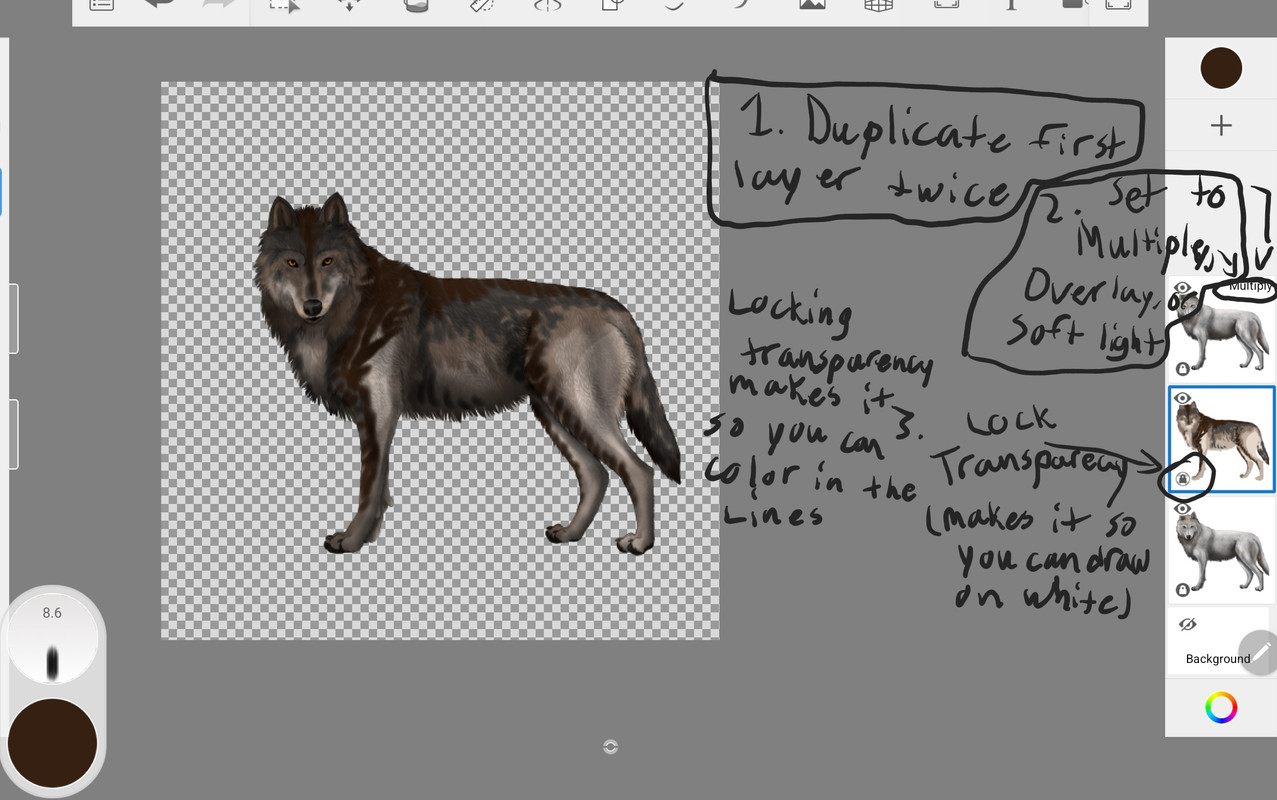
I tried to explain it in this image but I don't know if it would make sense. You can also lock transparency on the top layer which has your blending setting and draw on the top layer. It works just as well. Also, I find using multiply works the best. I can try to help explain further if this doesn't help.
Serpents said:
Graywing said:
Serpents said:
Graywing said:
Serpents said:
thanks this helps as I have been asking for so long How others get so nice pelts :D Ill be using this for every pelt now, how do I erase the eyes and nose? as I think I did it wrong I no cant get them back?
erase the eyes and nose on the color layer, that way the normal eyes and nose will be there EDIT:  like this
ah thanks nother question How do I not get leaks on the color layer?
Lower the tolerance level
so Like the Brush size
It helps I mean Im used kirta but thanks maybe using a mouse is not good idea XD(what I use ) |
|
|
| |

Darkseeker
|
but how do I upload the photo onto the forum on my iPad? |
|
|
| |
Darkseeker
|
The Stars said:
but how do I upload the photo onto the forum on my iPad?
|
|
|
| |
Neutral
|
Is there anyway I can do this without needing a app? My device doesn't have enough space to get another app... |
|
|
| |
Neutral
|
|
| |
Neutral
|
|
| |
Darkseeker
|
Gribbys Pack said:
How do i download image
Mobile/Touchscreen: Hold the image until a popup comes up, you'll see download image Desktop: Left and right click at the same time over the image, save as or download should appear Though it may be different for you if those don't work |
|
|
| |
Neutral
|
how do i download the wolf to do my own? |
|
|
| |
Neutral
|
Acornclan explained in the post just above yours :) |
|
|

 Summer Month: 2
  Night
Night  Clear Moon: