Wolf Play Game

Wolf Play Game
 Fall Month: 3   Day   Sunny
    

Chatbox

Log in to view the Chat.

Refresh

You must be a registered member for more
than 1 day before you can use our chatbox.


Quests

Embark on a Quest.

Alliance Battles

Join an Alliance.

Challenges

Hourly Damage Variances
Bobcat : +1
Wolverine : +4
Alligator : +1


WolfPlay Game
Chatbox

Log in to view the Chat.


Refresh

You must be a member for more than 1 day before you can chat.

Forums

→ WolfPlay is a fun game! Sign Up Now!


My Subscriptions
My Bookmarks
My Topics
Latest Topics
Following

Forums > Artwork > Art Help
   1 

Digital Art ColouringDecember 23, 2025 10:51 AM


Echo Eclipse

Darkseeker
 
Posts:834
#3120194
Give Award
I'm used to traditional art and I am new to digital. I can't figure out how to colour and make the lines look clean, shade etc. Like other artists (showoffs lol.)
I have sketchbook and ibisPaint X.
Digital Art ColouringDecember 23, 2025 12:11 PM


Smilecat

Lightbringer
 
Posts:1632
#3120195
Give Award
Hey there!
I started out with Sketchbook and Clip Studio and now use IbisPaintX
First off, getting cleaner lines is a product of patience and a stable hand. Turning on stabilization is also good for smooth linework. To color, make a layer underneath your lines and color away. I personally use a grey base and clipping layers, and color on top, using the fill bucket.
For simple shading, make a layer underneath your lines, but on top of your color and set the layer blending mode to multiply. Choose a darker, saturated color for your shadows. Stay away from greys, unless the charater you're drawing is greyscale.
For simple lighting, make a new layer above your shadows and under your lines. Set the layer mode to add and choose a light, saturated color.
Keep in mind your lightsource and how light interacts with different surfaces and textures. Play around with filters and brushes a bit, experiment. There's no such thing as bad art, its just another step to reach your goal.
Feel free to PM me for anything art related!
Digital Art ColouringJanuary 4, 2026 12:29 AM


Tonneoshet

Neutral
 
Posts:1438
#3121451
Give Award
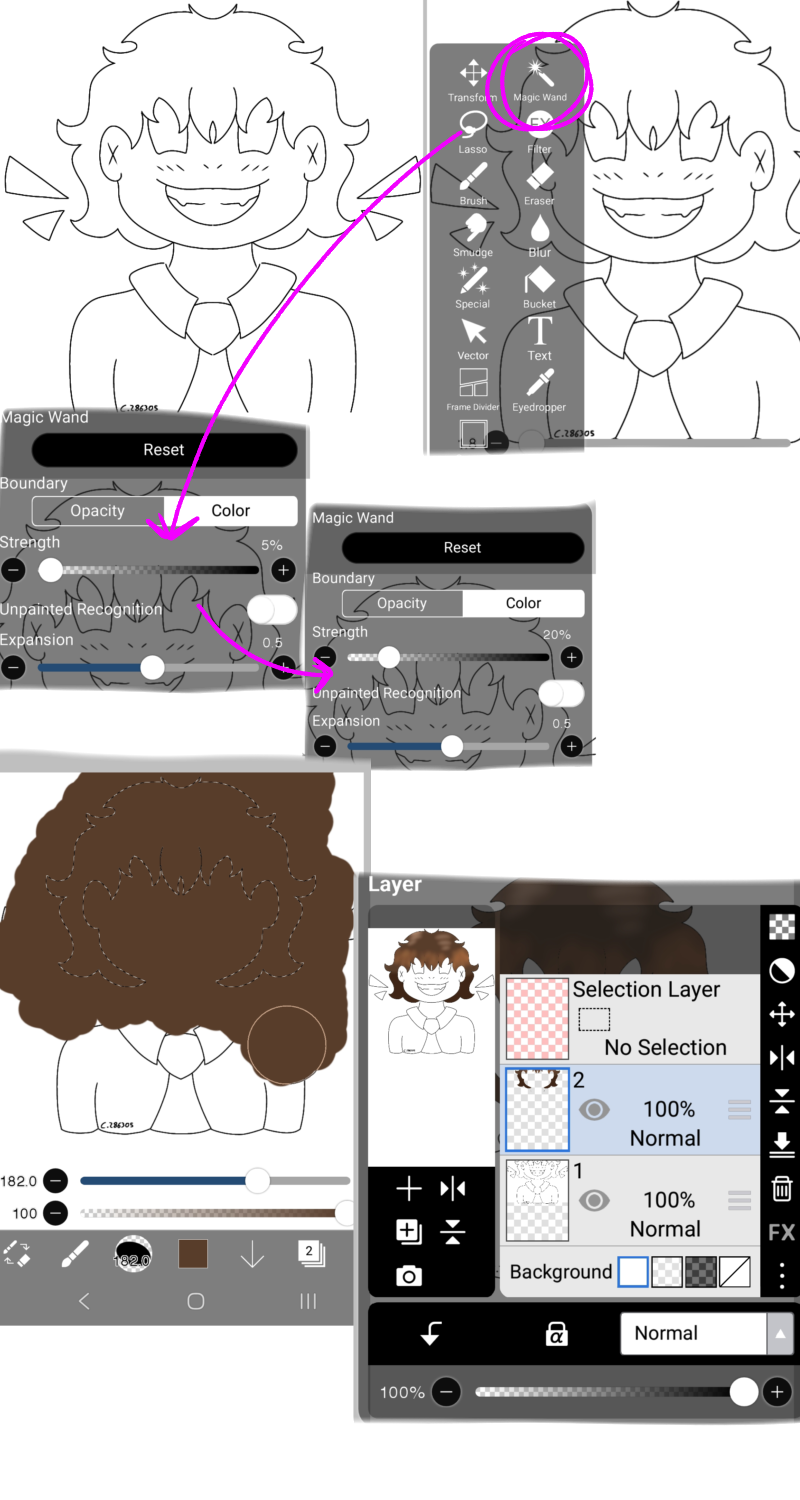
I'm not always the best at explaining so I attempted to do up some steps that I personally do for my own art!
If you're doing traditional to digital, you can take a picture and import it onto a canvas! Afterwards you can lower the opacity, create a new layer on top and start to follow the lines like guides!
I can break these down more if ya have any questions!
For the colouring, I like to use different layers for different parts of the art! Im a big fan of using the magic wand as it keeps colour's within the lines and makes it easier to fill parts in. I also love using the blur tool for shading, blush and the likes.
All art shown was made by me!!

Edited at January 4, 2026 12:29 AM by Tonneoshet

Forums > Artwork > Art Help
   1 

Refresh