| |

Forum Moderator
Lightbringer
|
At the moment, there is not. I don't think Eve ever turned custom palettes back on for the Packs Online page. I don't even remember if it were ever on in the first place, oops. |
|  |
|
| |

Lightbringer
|
Is there a code to change the color of the links here? Edit: What's the code for changing the background color of toast notifications? |
|
|
| |
Forum Moderator
Lightbringer
|
Question, do you mean the Realm/Help tabs for links in that first image or the Packs Online # link?
For the first image "Explore/Battle" links, you need to change the .veryblack hex code or add it if it's not in your palette already. For the second image, that's the .veryblack a:link and .veryblack a:visited hex code. For the code to change the Toast notifications background, that'll be the following: .poll-body { background-color: #HEX !important; } along with .tertiary for a bit of it. |
| |
|
| |
Lightbringer
|
Reficul said:
Will edit an answer in about three hours, or sooner if I can access my laptop before then. Question, do you mean the Realm/Help tabs for links in that first image or the Packs Online # link? For now, you could use the "Find On Page" feature to track down the #000 HEX set for links. It might be mainlineblack a:link, but I'm not 100% sure without checking my own palettes. I also have the codes for the Toast feature, so I'll be adding that when I can [today].
The "Explore" and "Battle" links |
|
|
| |
Lightbringer
|
Reficul said:
Question, do you mean the Realm/Help tabs for links in that first image or the Packs Online # link?
For the first image "Explore/Battle" links, you need to change the .veryblack hex code or add it if it's not in your palette already. For the second image, that's the .veryblack a:link and .veryblack a:visited hex code. For the code to change the Toast notifications background, that'll be the following: .poll-body { background-color: #HEX !important; } along with .tertiary for a bit of it.
Got it, thank you^^ |
|
|
| |

Neutral
|
is there a way to remove this? i tried to do everything, and it's not moving away 😭 |
|
|
| |
Neutral
|
Cragroot said:
is there a way to remove this? i tried to do everything, and it's not moving away 😭
should be this:
.col-md-7 {display: none;} |
|
|
| |
Neutral
|
Caeruleum said:
Cragroot said:
is there a way to remove this? i tried to do everything, and it's not moving away 😭
should be this:
.col-md-7 {display: none;}
oh my goodness, you just saved me a headache, thank you! |
|
|
| |
Neutral
|
|
| |
Forum Moderator
Lightbringer
|
Does anyone know how to remove the WP Logo Header from mobile palette views? Chatbox header area too. ^^' Image for chat part, with two more questions. 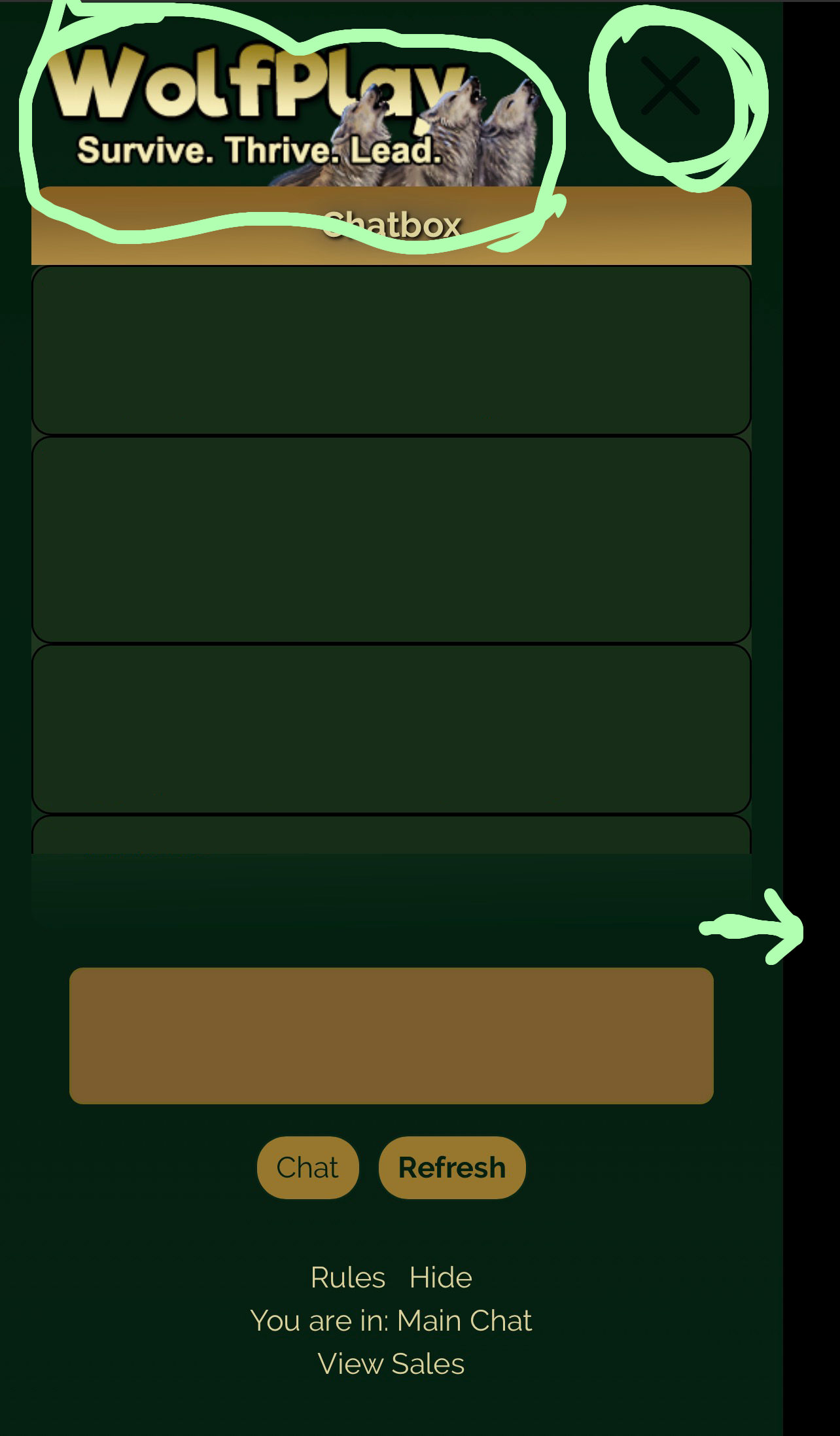
Forgive the sloppiness, I am doing this in a moving vehicle.
Does anyone know how to change the [X] and/or if it's possible to make the chatbox extend to fill the entire screen instead of leaving a blank spot on the side? |
| |
|

 Summer Month: 2
  Day
Day  Heavy Rain


