| |
Neutral
|
Stray Secrets said:
Spotlight Tango said:
Does anyone know how to code the text from being well, just black? I can't see it >.>
try this? .mainlineblack { color: #fff; } .explorelevel { color: #fff; }
It doesn't seem to be working... maybe I'm putting it in the wrong area? |
|
|
| |

Darkseeker
|
Spotlight Tango said:
Does anyone know how to code the text from being well, just black? I can't see it >.>
Was looking for something in here and just saw this. If you're talking about the text beside the wolf image, it should be .mainlineblacksmall {color: #HEX;} |
|
|
| |
Darkseeker
|
Jack Frost said:
I forgot about this, went on hiatus, came back and noticed that nobody ever replied to me so I figured I'd quote my post as a "reminder". Anyways, I still need help. Apparently I figured out the code for quite a few of my palettes, but cannot for the life of me now figure out what I did. I'd love it if somebody could kindly remind me please. Thank you in advance. Grim Reaper said:
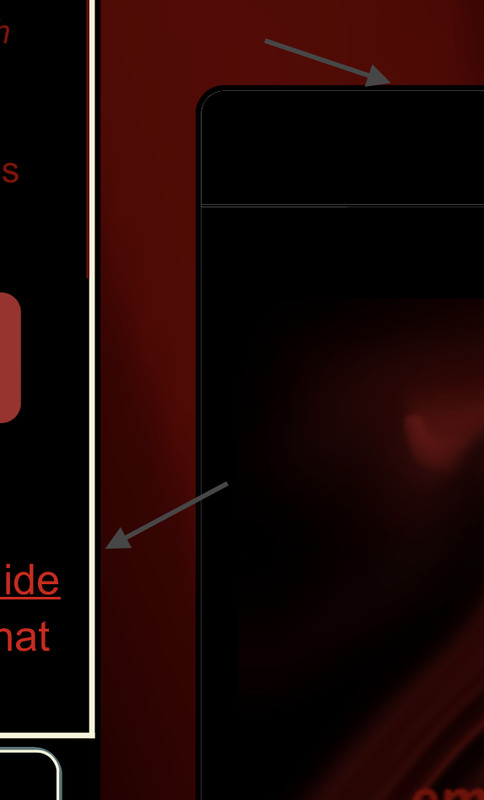
I went through the entire Custom Palette CSS styles topic, and found nothing on this. Please forgive me if it was already asked. How do I change these borders? Code for the border on the left should be #leftcolumn div {border-color: #HEX!important;}
Border on the right should be div.primary {border: 1px solid #HEX;} |
|
|
| |

Darkseeker
|
How do I put an image as the pgbg? |
|  |
|
| |

Neutral
|
Sorry to be a bother, but does anyone know how to change these?
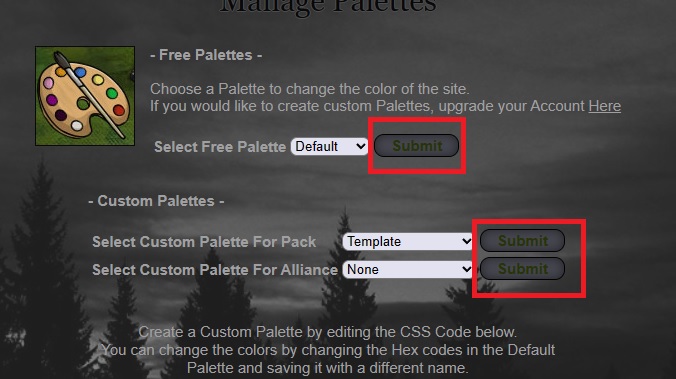 (Change the colour of the text in the buttons for Post/Submit/Paws Up/etc.)  (Change the colour of/remove the forum borders) |
|
|
| |

Neutral
|
I don't know about the forum border but for the buttons use this. Each button is a different color (RBG) so you know which one is which. Also for mine I don't know why but it brakes my pallet if it is at the bottom but it doesn't brake it if it is at the top of the pallet coding. Just in case it brakes your pallet. .wpbutton a:link { font-family:arial,sans-serif; font-size:15px; color:#dac972; background-color: #0000ff;
padding:2px; text-decoration: none; } .wpbutton a:visited {font-family:arial,sans-serif;font-size:15px;color:#000000;background-color: #ff0000;
padding:2px;text-decoration: none;} .wpbutton {font-family:arial,sans-serif;font-size:15px;color:#000000;background-color: #00ff00; padding:2px;-webkit-border-radius:5px;border-radius:5px;border: 1px solid #000000;text-decoration: none;}
limbo said:
Sorry to be a bother, but does anyone know how to change these?
(Change the colour of the text in the buttons for Post/Submit/Paws Up/etc.) (Change the colour of/remove the forum borders)
|
|
|
| |
Neutral
|
Ack >-< Well, I've struggled with this for a bit. Can I get more help with changing the page background to be transparent? I'm using this-
.pgbg {
background-color: rgba(0, 0, 0, 0);
}
|
|
|
| |
Neutral
|
Are you talking about this (The pink Background)? If so, use this image/ code .pgbg {
background:url(i.postimg.cc/4NGnyxrs/Clear-BG.png);
} Let me know if it works for you. I tested it on mine before I made this reply and it worked for me.
Qyusen said:
Ack >-< Well, I've struggled with this for a bit. Can I get more help with changing the page background to be transparent? I'm using this-
.pgbg {
background-color: rgba(0, 0, 0, 0);
}
|
|
|
| |
Neutral
|
Doesn't work, unfortunately, but thanks. Might be something else then if yours works, I'll check again. |
|
|
| |
Neutral
|
Sam D said:
I don't know about the forum border but for the buttons use this. Each button is a different color (RBG) so you know which one is which. Also for mine I don't know why but it brakes my pallet if it is at the bottom but it doesn't brake it if it is at the top of the pallet coding. Just in case it brakes your pallet. .wpbutton a:link { font-family:arial,sans-serif; font-size:15px; color:#dac972; background-color: #0000ff;
padding:2px; text-decoration: none; } .wpbutton a:visited {font-family:arial,sans-serif;font-size:15px;color:#000000;background-color: #ff0000;
padding:2px;text-decoration: none;} .wpbutton {font-family:arial,sans-serif;font-size:15px;color:#000000;background-color: #00ff00; padding:2px;-webkit-border-radius:5px;border-radius:5px;border: 1px solid #000000;text-decoration: none;} Thank you, however I already have this code in my palette; it changes some of the buttons, but not the specific buttons (circled in my screenshot) that I would like to edit. Is this a mistake on my part?
Qyusen said:
Ack >-< Well, I've struggled with this for a bit. Can I get more help with changing the page background to be transparent? I'm using this-
.pgbg {
background-color: rgba(0, 0, 0, 0);
}
This is what I've used for my current palette. It uses rgb instead of rgba, not that there's much of a difference. Not saying it'd fix it, but it's something to try if you haven't already (?)
.pgbg { background-color:rgb(76,76,76,0.4); }
*Change the 0.4 to 0 for total transparency
|
|
|

 Summer Month: 1
  Day
Day